QAI
Automate your QA process and cut hundreds of hours of review time.
BOOK A DEMO →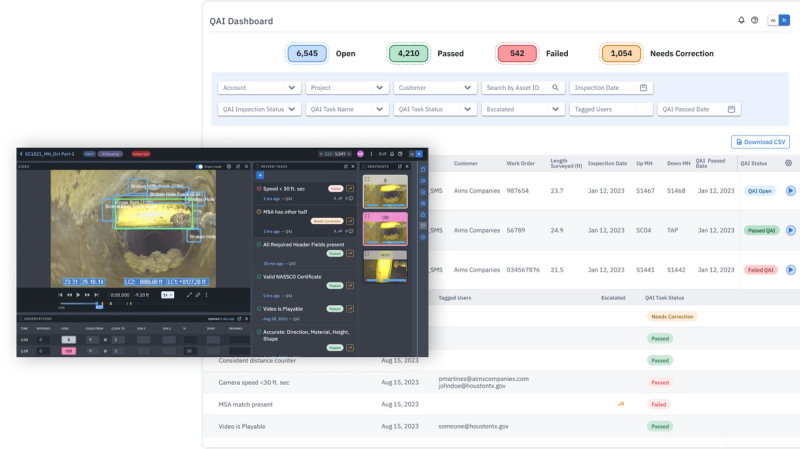
KEY CAPABILITIES
Comprehensive Automated Checks
Includes verification of Survey Headers, validation of each Operator's NASSCO™ credentials, as well as confirmation of functioning distance counter, in-pipe camera speed, and video playback.
Customizable Check Parameters
Choose specific checks, defining 'hard' and 'soft' no-pass criteria and workflows. Easily customize every project to your exact specifications.
Dashboard
An intuitive dashboard provides insights on inspection status, header corrections, and optical quality issues at a glance.
Automate your QA process
AI-powered quality checks ensure your data meets project standards and specifications seamlessly. When provided with underlying asset data, QAI aligns inspections with known assets, specific project scopes, or an Owner's system of record, such as GIS.
Eliminate reinspections
Our advanced platform guarantees unparalleled integrity, accuracy, and efficiency for video inspections, revolutionizing traditional methods of quality checks.
Decrease costs. Increase accuracy and speed.
Get started for free →Types of Checks
Required Fields Present
Ensures all required header fields (e.g., Street) are completed, including any project-specific fields.
Valid NASSCO Certificate
Verifies the operator's NASSCO certificate number.
If MSA, Has Reversal
If an inspection ends in an MSA, checks whether another inspection in the upload exists with matching asset identifiers in the reverse direction.
Matches Known Asset
Compares imported inspection data against a pre-filled asset list uploaded via CSV, verifying key asset information is correct.
{Header Field}: Meets Allowed Value
Validates that header field entries match the list of allowed values defined for the project.
{Codes} Within Allowable Value
Checks whether certain defined codes exceed the set thresholds for value %, dimensions, or other limits.
Distance Counter Functioning
Ensures the distance counter is visible and actively updating during inspection.
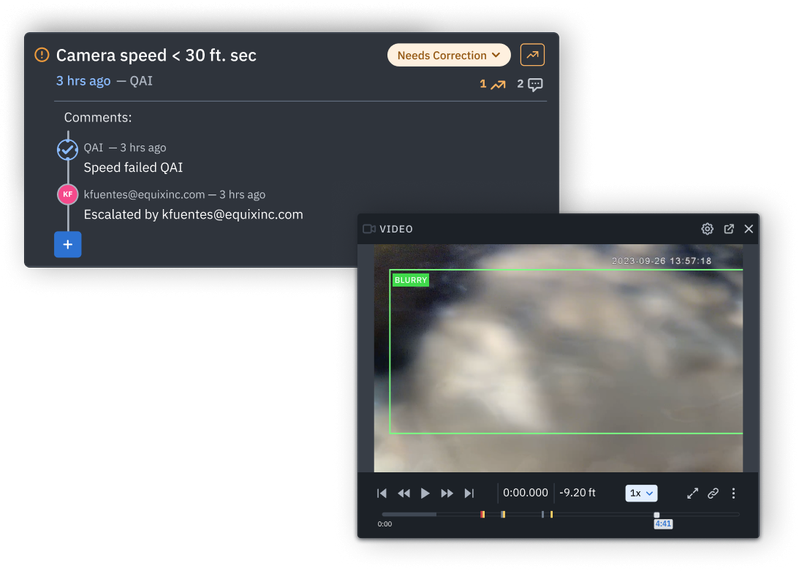
Speed < 30 ft./min.
Confirms the camera stays within acceptable speed limits for thorough inspection.
Video Quality Acceptable
Evaluates overall video clarity by confirming the internal circumference of the pipe is visible, the camera is not underwater for >5 LF, and blurry frames are detected in <1/5 frames in the video.
READY TO GET STARTED WITH QAI?
See how QAI can transform your sewer inspection workflow.
BOOK A DEMO →